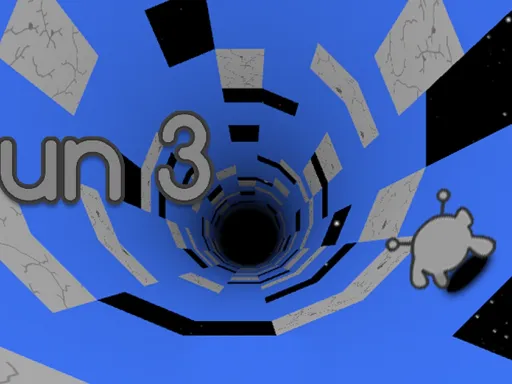
Run 3


Rating:
4.73
Played:
8,567
What Is Run 3?
Run 3 is an endless tunnel-runner and platform game set in outer space. You control a small alien who sprints forward through floating tunnels made from fragile tiles. Your job sounds simple: keep running, jump over gaps, and rotate the tunnel so you always have solid ground under your feet. As the levels go on, the game adds new tile types, moving platforms, and low-gravity sections that force you to react quickly and plan ahead.
Unlike many simple runners, this title actually has a story. Different alien characters explore the mysterious Tunnels, trying to find a safe path across the galaxy. Each character has special abilities, and the stages are arranged like a map you unlock step by step. That mix of story, challenge, and constant motion is a big reason why Run 3 is still popular years after release.
Explore Mode and Infinite Mode
There are two main ways to play Run 3. In Explore Mode, you move across a galaxy map, unlocking levels as you go. Each stage is a piece of the larger tunnel system, and you can replay earlier areas to try new paths or use different characters.
Infinite Mode is all about survival. Instead of a level map, you run through a never-ending tunnel that keeps generating obstacles ahead of you. One wrong step, and you fall into space and the run ends. Along the way, you can grab power cells and chase high scores, making this mode perfect for quick sessions or friendly competitions.
How to Play Run 3 in Your Browser
One of the best things about Run 3 is how easy it is to start. You do not need to download anything or install extra software. The game runs directly in a modern web browser using HTML5, so you can open it, press play, and start running within seconds.
To play in your browser, open a desktop browser and go to https://electrondashgame.org, then open the Run 3 page and wait for it to load. Once the title screen appears, choose Explore Mode or Infinite Mode and press the start button.
Best Devices and Browser Tips
This runner works smoothly on most desktop and laptop computers. For the best experience, use a full-size keyboard, since the game relies on precise arrow-key movement. Close heavy background tabs if your device is older, and make sure your browser is up to date so Run 3 loads quickly. If the game ever stutters, restart the browser, then reload it on electrondashgame.org.
Run 3 Controls and Basic Mechanics
The controls are simple, but the way Run 3 uses them is very clever. On keyboard, the basic setup is:
- Left Arrow – move your character left and slide toward the left wall
- Right Arrow – move your character right and slide toward the right wall
- Up Arrow – jump over gaps or onto higher tiles
- Spacebar or another key – in some versions, pause or use special actions
Your character never stops moving forward unless you hit a wall or fall into space. When you run up onto a wall, the entire tunnel rotates so that wall becomes the new floor. This gravity-shifting mechanic is what makes Run 3 feel different from many other runners.
Gravity, Tunnels, and Characters
Every stage is built around tunnels made from tiles with different effects. Some crumble after you step on them, others move or vanish, and later tunnels may include low-gravity areas that change how far you jump. As you progress, paths get narrower and obstacles appear faster, so small mistakes quickly lead to failure.
Where Did Run 3 Come From?
Run 3 is the third game in the Run series, created by independent developer Player 03. Early versions appeared around 2013 and 2014, first on mobile devices and then as a browser game. Over time, new levels, characters, and features were added, including a full storyline and a detailed galaxy map that ties the tunnels together.
Originally, the game was built with Flash technology, but as browsers changed, newer editions were rebuilt in HTML5 so people could keep playing without extra plugins. Today, this classic continues to live on as a quick, low-friction browser game: open the page, press a key, and dash through space. Hosting Run 3 on sites like electrondashgame.org keeps it easy to access for both new players and old fans.
Frequently Asked Questions About Run 3
Is Run 3 free to play?
Yes. Run 3 is a free browser game. When you load Run 3 on electrondashgame.org, you can start playing without paying or creating an account.
Do I need to download anything?
No. Run 3 runs directly inside your browser window. As long as you have a stable internet connection and a modern browser, you are ready to go.
Can I save my progress?
In many browser versions, your Run 3 story progress and unlocked characters are stored in your browser’s local data. If you clear your cache or swap devices, that data might reset, so it is safest to keep playing on the same device if you want to finish Explore Mode and see more of the story.
Why does the game get so hard later on?
The difficulty in Run 3 is meant to ramp up over time. New tiles, faster tunnels, and trickier gaps appear as you get deeper into the campaign. The gravity rotation mechanic also becomes more important, and some levels expect you to swap walls several times in a single jump. Failing often is normal — learning each tunnel is part of the fun.
Where is the best place to play?
For a smooth, simple experience, play Run 3 directly in your browser on https://electrondashgame.org. You can jump into Explore Mode to follow the story or switch to Infinite Mode and chase your best distance. Whether you are new to the series or already love endless runners, Run 3 on electrondashgame.org is a fast, addictive way to test your reflexes among the stars.
Comments
Loading comments…